Nextcloud Talk needs a TURN server so that participants behind firewalls and strict NATs can join calls. Talk generates TURN credentials itself from a shared secret, so you connect it to Turnix with your project's auth secret. This takes about five minutes.
Run Claude Code (or another agent with shell access) on your Nextcloud server, set TURNIX_AUTH_SECRET in that shell, and paste the prompt below. The agent configures Talk with occ and checks the result.
Configure Nextcloud Talk on this server to use Turnix (managed TURN/STUN) as its STUN and TURN server.

Context about Turnix:
- STUN server: stun.turnix.io:3478
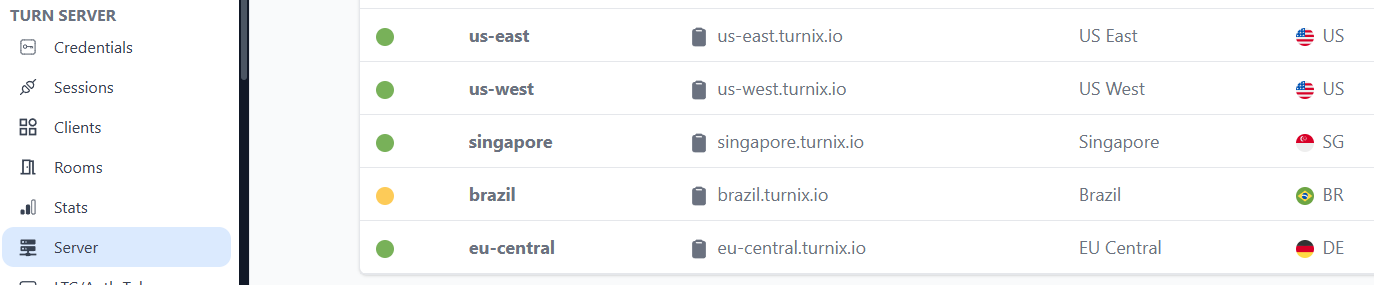
- TURN servers: <region>.turnix.io on port 3478 (turn, UDP and TCP) and port 443 (turns, TCP only). Ask me which region to use (for example us-west) if I have not said so. The region list is at https://turnix.io/app/turn/server.
- Talk generates TURN credentials itself from a shared secret. The secret is my Turnix project's auth secret, available in the environment variable TURNIX_AUTH_SECRET. Never print it, write it into files other than the Nextcloud config, or include it in your summary.
- Docs: https://turnix.io/docs/integrations/nextcloud

Do the following:
1. Find the Nextcloud installation and how occ is run here (usually sudo -u www-data php occ in the Nextcloud directory, or docker exec into the app container). Check that the Talk app (spreed) is installed and enabled. If TURNIX_AUTH_SECRET is empty, stop and ask me to set it.
2. Show me the current settings with occ talk:stun:list and occ talk:turn:list before changing anything.
3. Add the STUN server: occ talk:stun:add stun.turnix.io:3478. Remove the default stun.nextcloud.com:443 entry if present (occ talk:stun:delete).
4. Add the TURN servers: occ talk:turn:add turn <region>.turnix.io:3478 udp,tcp --secret="$TURNIX_AUTH_SECRET" and occ talk:turn:add turns <region>.turnix.io:443 tcp --secret="$TURNIX_AUTH_SECRET". Remove old TURN entries that point to a local coturn only after asking me.
5. Run occ talk:stun:list and occ talk:turn:list again and show me the result with the secret masked.
6. Tell me how to verify: start a call between a laptop on Wi-Fi and a phone on mobile data, then check Sessions in the Turnix dashboard (https://turnix.io/app/turn/sessions).
Before you start#
- Admin access to your Nextcloud instance with the Talk app installed
- A Turnix project (the free plan works)
1. Get the Turnix values#
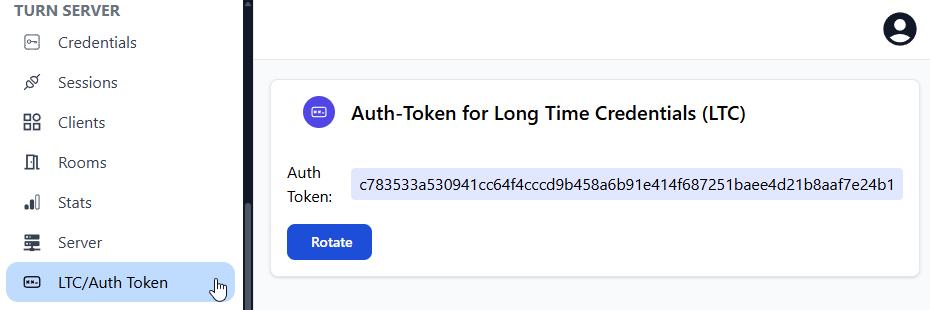
- In the Turnix dashboard, open LTC/Auth Token and click Create (or copy the existing secret).
- Open Server and copy the endpoint of an online region close to your users, for example
us-west.turnix.io.
2. Configure Talk in the admin UI#
In Nextcloud, go to Administration settings → Talk.
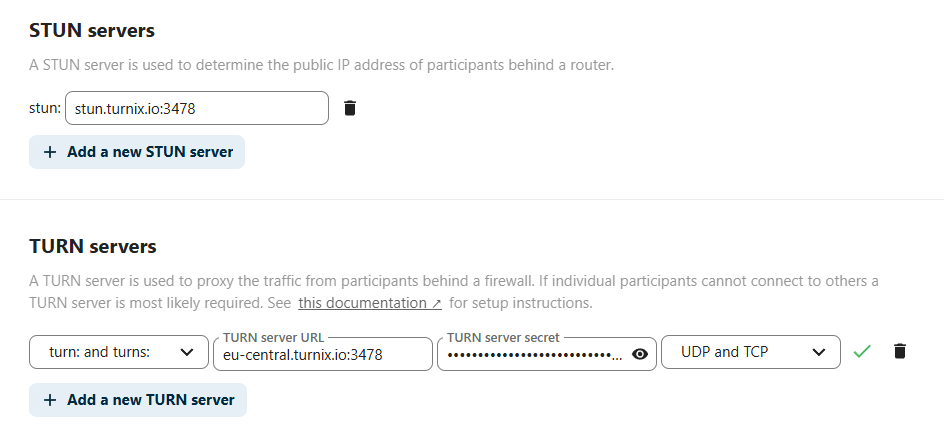
STUN servers: replace the default entry with:
stun.turnix.io:3478
TURN servers: add two entries, one for plain TURN and one for TURN over TLS on port 443:
| Field | Entry 1 | Entry 2 |
|---|---|---|
| Schemes | turn: only |
turns: only |
| TURN server URL | us-west.turnix.io:3478 |
us-west.turnix.io:443 |
| TURN server secret | your auth secret | your auth secret |
| Protocols | UDP and TCP |
TCP only |
Enter the URL without a turn: prefix. Use the Test this server button next to an entry to check it; a successful test shows a checkmark.
Alternative: configure with occ#
On recent Talk versions you can configure the same settings from the command line (run as the web server user, for example sudo -u www-data php occ …):
php occ talk:stun:add stun.turnix.io:3478
php occ talk:turn:add turn us-west.turnix.io:3478 udp,tcp --secret="$TURNIX_AUTH_SECRET"
php occ talk:turn:add turns us-west.turnix.io:443 tcp --secret="$TURNIX_AUTH_SECRET"
php occ talk:turn:list
Remove the default STUN server if you no longer want it: php occ talk:stun:list and php occ talk:stun:delete <server>.
3. Verify#
- Start a call between two devices on different networks, for example a laptop on office Wi-Fi and a phone on mobile data.
- In the Turnix dashboard, open Sessions. Relayed calls appear there and their traffic counts toward the project that owns the secret.
Troubleshooting#
| Problem | Fix |
|---|---|
| Test fails or calls do not connect behind firewalls | Check that the secret matches the dashboard exactly and that the region is online. If you rotated the secret, update it in Talk. |
| Works on some networks only | Make sure the turns: entry on port 443 with TCP only is configured. |
| Calls with more than a few participants are poor | TURN solves connectivity, not scaling. For larger calls, Nextcloud recommends its High-performance backend. |