Turnix + Nextcloud Talk Integration#
Nextcloud Talk enables secure, self-hosted video calls and chat. To ensure reliable connectivity behind firewalls and NAT, it requires TURN/STUN servers. Turnix.io provides a managed, global TURN/STUN infrastructure that integrates seamlessly with Nextcloud Talk.
⚙️ Prerequirements in Turnix.io#
Nextcloud Talk uses TURN/STUN servers defined in its administration settings. Turnix makes this simple by generating ready-to-use credentials:
- Log into your Turnix Dashboard.
- Goto LTC/Auth Token Menu under Turn Server.
- Generate your auth token and save it for later use
- Get hostname of one of the available regions for your plan
Now you are ready to configure TURN and STUN Server in your nextcloud installation
🔐 NextCloud Talk Configuration#
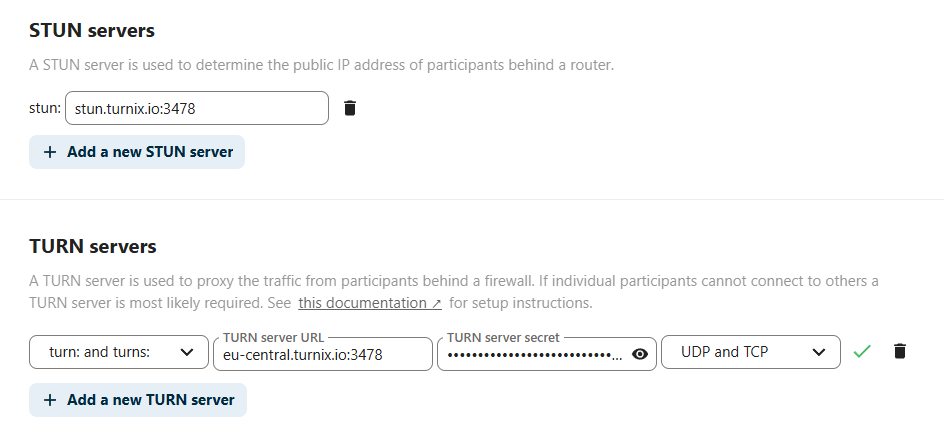
Go to the settings of Nextclound Talk, scroll down to TURN Settings, and adjust configuration based on previous retrieved parameters. Like this:
📌 Summary#
- You prepared Turnix.io to work with Nextcloud
- You generated AUTH Key for Long Time Credentials
- You configured Nextcloud Talk TURN Server
- 🎉
Tip
Step-by-step setup in the docs: Nextcloud Talk integration