Voice assistants, video avatars and realtime tutors increasingly talk to users over WebRTC. When the bot is your own WebRTC peer (Pipecat, FastRTC, a self-hosted LiveKit server, aiortc, Pion or Node.js), something has to get the media through the NAT and firewalls on both sides: the user's mobile network or office Wi-Fi, and the Docker, Kubernetes or cloud network your agent runs in. That is the job of a TURN server.
This guide shows how to add Turnix TURN/STUN to a voice or video AI agent in a few lines: one credential request per agent session, shared by the user and the bot.
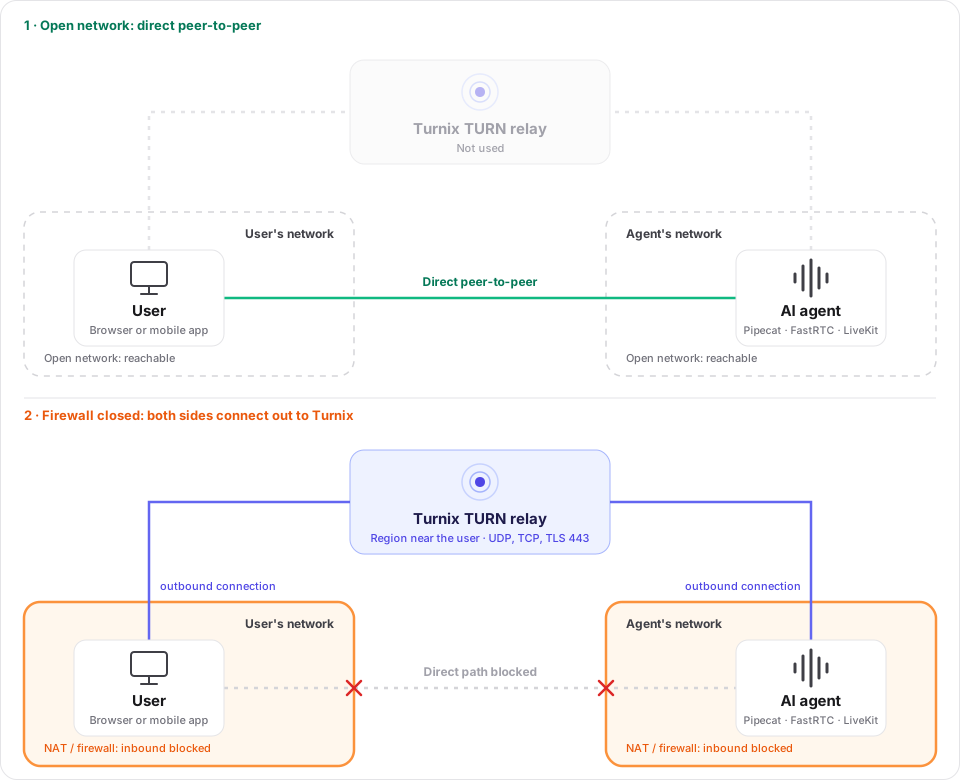
WebRTC always tries the direct, peer-to-peer path first. TURN does not open the firewall. Firewalls and strict NAT block inbound connections, but outbound connections work, so both peers connect out to the Turnix relay, and the relay forwards the media between them.
Open your agent project in Claude Code, Cursor or GitHub Copilot, copy the prompt below and paste it in. The coding agent does every step of this guide for you. Review the diff before you commit.
Add Turnix (managed TURN/STUN servers) to the WebRTC voice/video AI agent in this repository. The agent (bot) is itself a WebRTC peer running on our servers; the user's browser or app is the other peer.

Context about Turnix:
- Endpoint: POST https://turnix.io/api/v1/credentials/ice
- Auth header: "Authorization: Bearer <token>". The token is a secret project API token. Read it from the environment variable TURNIX_API_TOKEN, only on the server. Never send it to the browser or app, never log it, never commit it.
- Optional body fields (JSON): ttl (integer seconds), room, initiator_client, receiver_client (letters, digits, "-" and "_" only), preferred_region or fixed_region (a region slug).
- Optional header X-TURN-CLIENT-IP: the end user's public IP. Set it whenever the user's IP is known: the request comes from our server, so without it Turnix picks the region closest to the server instead of the user.
- Success (200) response: {"iceServers":[{"urls":["stun:stun.turnix.io:3478"]},{"username":"<uuid>","credential":"<hex>","urls":["turn:<region>.turnix.io:3478?transport=udp","turn:<region>.turnix.io:3478?transport=tcp","turns:<region>.turnix.io:443?transport=udp","turns:<region>.turnix.io:443?transport=tcp"]}],"expiresAt":"<ISO 8601 UTC timestamp>"}
- Errors are JSON with an "error" field: 401 (missing or unknown token), 422 (invalid parameter or region), 429 (usage limit reached).
- A connected session keeps working after expiresAt; only new relays (ICE restart, renegotiation) need valid credentials. The default ttl is only 30 seconds, so always send ttl.
- The same iceServers can be used by both peers of one session.
- aiortc (used by Pipecat SmallWebRTC and FastRTC) uses only the first STUN and the first TURN URL it can use, and supports turns: only with transport=tcp. Keep the Turnix order (UDP first).
- Pipecat: create SmallWebRTCConnection(ice_servers=[IceServer(urls=..., username=..., credential=...)]) per session; on the JS client pass new SmallWebRTCTransport({ iceServers }).
- FastRTC: Stream(..., rtc_configuration=<plain sync or async function without arguments returning {"iceServers": [...]}>, server_rtc_configuration=<dict>) - the function is called on every /turn request; bound methods do not work, wrap them in a plain function.
- Self-hosted LiveKit server: rtc.turn_servers entries with host, port, protocol (udp, tcp or tls) and secret (the Turnix project auth secret, coturn-style shared secret) plus ttl.
- Docs: https://turnix.io/docs/integrations/voice-ai-agents and https://turnix.io/docs/api-reference/credentials

Do the following:
1. Inspect the repository. Find where a new agent session starts (for example a /start, /connect or /offer endpoint), where the user's browser/app creates its peer connection or transport, and where the bot creates its peer connection (Pipecat SmallWebRTCConnection, FastRTC Stream, LiveKit server config, aiortc RTCPeerConnection, Pion, node-datachannel or similar). Follow the existing conventions. If the agent uses a hosted media platform that provides its own TURN servers (Daily, LiveKit Cloud, OpenAI Realtime over WebRTC), stop and tell me that Turnix is not needed there.
2. Add a server-side helper that requests Turnix credentials once per agent session: forward the user's public IP in X-TURN-CLIENT-IP when known (respect the trusted-proxy setup), send ttl=3600 (or the maximum session length if sessions are longer), room=<session id>, initiator_client=<user label> and receiver_client=<agent label> (sanitize to [A-Za-z0-9_-], no personal data). Use a 10-second timeout. Map Turnix 401 to a configuration error in the logs and 429 to a "TURN usage limit reached" error; never include the token in errors or logs.
3. Bot side: pass the iceServers to the bot's peer connection for that session, converted to the library's types. Do not share one credential across all sessions unless the framework only allows a static configuration; then explain the trade-off to me.
4. Client side: return only {"iceServers": [...], "expiresAt": "..."} for this session to the user's browser/app (for example in the /start response) and pass them to the client's peer connection or transport.
5. Configuration: add TURNIX_API_TOKEN to .env.example (empty, with a comment) and the README. Make sure .env is git-ignored.
6. Tests: add a test with a mocked Turnix API that checks the Bearer token and X-TURN-CLIENT-IP are sent, both peers get the same iceServers, and the token is never returned to the client. If TURNIX_API_TOKEN is set in my environment, make one real curl call and show only the status code and the number of iceServers.
7. Tell me how to verify the relay (iceTransportPolicy "relay" in the browser for a test session, then check the Sessions page in the Turnix dashboard) and summarize the files you changed and what I still need to do.
Do AI agents need a TURN server?#
It depends on where the agent's media connection ends:
| Your setup | Turnix needed? |
|---|---|
| The bot is your own WebRTC peer: Pipecat with SmallWebRTC, FastRTC, aiortc, Pion, node-datachannel | Yes. |
| You run your own LiveKit server for LiveKit Agents | Yes, as the TURN servers of your LiveKit server (or use LiveKit's embedded TURN). |
| The bot runs in Docker, Kubernetes or a cloud VM without a public IP | Yes, on both sides. |
| A hosted media platform carries the call (Daily, LiveKit Cloud, Twilio, OpenAI Realtime over WebRTC) | No. The platform provides its own TURN servers. |
| The bot talks to the user over WebSockets only, no WebRTC | No. |
A share of WebRTC sessions, commonly cited as 10–20 %, cannot connect directly: users on mobile networks with carrier-grade NAT, corporate networks that only allow port 443, and bots behind NAT. Without TURN, these users see an agent that never answers.
How it works#
- The user starts a session with your backend, as today.
- Your backend requests one credential from Turnix for that session, with the user's IP so the relay region is close to the user.
- It gives the same
iceServersto the bot and returns them to the user's client. - ICE picks the best path: direct when possible, otherwise through the Turnix relay over UDP, TCP or TLS on port 443.
The bot runs on your server, so it can use the token directly. The user's browser or app only receives iceServers, which expire on their own.
Request credentials per session#
Do this where a new agent session starts. Pass the user's IP, not the bot's: the request comes from your server, so without X-TURN-CLIENT-IP Turnix picks the region closest to your server.
import os, re, httpx

TURNIX_URL = "https://turnix.io/api/v1/credentials/ice"

def _label(value: str) -> str:
    return re.sub(r"[^A-Za-z0-9_-]", "-", value)[:64]

async def turnix_ice_servers(user_ip=None, session_id=None, user_id=None, ttl=3600) -> dict:
    headers = {"Authorization": f"Bearer {os.environ['TURNIX_API_TOKEN']}"}
    if user_ip:
        headers["X-TURN-CLIENT-IP"] = user_ip
    body = {"ttl": ttl, "receiver_client": "agent"}
    if session_id:
        body["room"] = _label(session_id)
    if user_id:
        body["initiator_client"] = _label(user_id)

    async with httpx.AsyncClient(timeout=10) as client:
        res = await client.post(TURNIX_URL, headers=headers, json=body)
    if res.status_code == 429:
        raise RuntimeError("TURN usage limit reached")
    res.raise_for_status()
    return res.json()   # {"iceServers": [...], "expiresAt": "..."}
The room, initiator_client and receiver_client labels are optional. With them, every agent conversation shows up as its own room in the dashboard, with the user and the agent as clients. See Clients & rooms. Don't use emails or names as labels.
Pipecat#
Pipecat is an open-source framework for voice and multimodal AI agents. Its SmallWebRTC transport connects the bot directly to the user. Create the bot's connection per session with that session's credentials:
from pipecat.transports.smallwebrtc.connection import SmallWebRTCConnection, IceServer

turn = await turnix_ice_servers(user_ip, session_id, user_id)
ice_servers = [
    IceServer(urls=s["urls"], username=s.get("username"), credential=s.get("credential"))
    for s in turn["iceServers"]
]

connection = SmallWebRTCConnection(ice_servers=ice_servers)
# ... initialize the connection with the client's offer and start your pipeline as usual
Return turn["iceServers"] to the user's client and pass them to the transport before connecting:
import { PipecatClient } from "@pipecat-ai/client-js";
import { SmallWebRTCTransport } from "@pipecat-ai/small-webrtc-transport";

// your backend's session endpoint returns { iceServers, expiresAt }
const { iceServers } = await fetch("/api/agent-session", { method: "POST" }).then((r) => r.json());

const client = new PipecatClient({
  transport: new SmallWebRTCTransport({ iceServers }),
  enableMic: true,
  enableCam: false,
});
await client.connect({ webrtcRequestParams: { endpoint: "/api/offer" } });
Build the connection in your own offer/start endpoint, one per session. Pipecat's development runner only takes a fixed list (--ice-servers or PIPECAT_ICE_SERVERS), which shares one credential across all sessions. For a quick local test there, a shared-secret credential with a long expiry works.
FastRTC#
FastRTC turns a Python function into a realtime voice or video stream over WebRTC. It has two settings:
rtc_configurationis for the user's browser. It accepts a function, which FastRTC calls on every connection request, so each user gets fresh credentials.server_rtc_configurationis for the bot's own peer connection. It is a fixed dictionary.
from fastrtc import Stream, ReplyOnPause

async def turnix_rtc_configuration():
    # plain function without arguments: FastRTC does not pass the request,
    # so Turnix picks the region closest to this server (or set preferred_region)
    turn = await turnix_ice_servers(ttl=3600)
    return {"iceServers": turn["iceServers"]}

stream = Stream(
    handler=ReplyOnPause(respond),        # your agent
    modality="audio",
    mode="send-receive",
    rtc_configuration=turnix_rtc_configuration,
)
- Use a plain
deforasync deffunction, not a method of a class. FastRTC only calls plain functions. - If the bot runs behind NAT, also set
server_rtc_configuration={"iceServers": ...}. It is read once, so fetch it at startup with attllonger than the app's uptime. A bot with a public IP doesn't need it.
LiveKit (self-hosted)#
With LiveKit Agents on your own LiveKit server, users connect to the LiveKit server, and the agent joins the room. LiveKit has an embedded TURN server. To use Turnix instead, with global regions, TLS on port 443 and no TURN certificates on your SFU, add Turnix as an external TURN server with your project's auth secret:
# livekit.yaml
rtc:
  turn_servers:
    - host: <region>.turnix.io
      port: 443
      protocol: tls
      secret: "<your Turnix auth secret>"
      ttl: 14400
    - host: <region>.turnix.io
      port: 3478
      protocol: udp
      secret: "<your Turnix auth secret>"
      ttl: 14400
Pick the region closest to your LiveKit server under Server in the dashboard. Test with a relay-only client (see Verify that the relay works). With LiveKit Cloud, nothing is needed: it brings its own TURN servers.
aiortc#
aiortc is the Python WebRTC library underneath Pipecat's SmallWebRTC and FastRTC:
from aiortc import RTCConfiguration, RTCIceServer, RTCPeerConnection

turn = await turnix_ice_servers(user_ip, session_id, user_id)
config = RTCConfiguration(iceServers=[
    RTCIceServer(urls=s["urls"], username=s.get("username"), credential=s.get("credential"))
    for s in turn["iceServers"]
])
pc = RTCPeerConnection(configuration=config)
Pion (Go)#
Pion is the Go WebRTC stack used by many custom media servers and agents. Its ICEServer type uses the same JSON field names as Turnix:
var turn struct {
    IceServers []webrtc.ICEServer `json:"iceServers"`
}
if err := json.Unmarshal(body, &turn); err != nil {
    return err
}

pc, err := webrtc.NewPeerConnection(webrtc.Configuration{ICEServers: turn.IceServers})
Node.js#
For agents in Node.js, node-datachannel ships a standards-style RTCPeerConnection:
import { RTCPeerConnection } from "node-datachannel/polyfill";

const { iceServers } = await turnixIceServers(userIp, sessionId, userId);
const pc = new RTCPeerConnection({ iceServers });
On the user's side, any browser uses the same iceServers:
const pc = new RTCPeerConnection({ iceServers });
Server library notes#
Browsers use every URL in iceServers. Server-side WebRTC libraries are more limited:
- aiortc, Pipecat SmallWebRTC and FastRTC use only the first STUN URL and the first TURN URL they can use. Keep the order Turnix returns: UDP first.
turns:(TLS) works only with?transport=tcp, and other entries are skipped. - Other libraries may reject URLs they don't support, most often
turns:…?transport=udp(TURN over DTLS). If yours fails on the config, drop that URL for the bot. The browser can keep all of them. - Restrictive networks are almost always on the user's side. The user's browser has the full list including TLS on port 443, which is what gets through corporate firewalls.
Does the bot itself need the relay?#
- The bot has a public IP: usually not. ICE connects the user to the bot directly, or only the user's side goes through Turnix. Pass the
iceServersto the bot anyway; it costs nothing. - The bot is behind NAT (Docker without host networking, Kubernetes, a private cloud network): yes. Both peers may relay through Turnix. Using the same credential, and so the same region, on both sides keeps that path short.
- The ports to open for the bot are outbound only: UDP and TCP 3478 and TCP 443 to
<region>.turnix.io.
Long sessions and reconnects#
- A session keeps running after
expiresAt. Only new relays need valid credentials. - Set
ttlto cover a normal session (3600for most agents). For longer sessions, request fresh credentials before an ICE restart. See Credentials & TTL. - Request new credentials for each new session. Don't reuse one credential across sessions or users.
Traffic#
Voice agents are light. An Opus audio stream uses roughly 30–60 kbit/s, which is about 15–30 MB per direction per hour. Video adds roughly 0.5–2 Mbit/s depending on resolution. Only relayed sessions count, and you can see them under Sessions in the dashboard. See Usage limits.
Verify that the relay works#
Force the user's side through Turnix for a test session. If the agent still answers, TURN works:
const pc = new RTCPeerConnection({ iceServers, iceTransportPolicy: "relay" }); // testing only
With a framework client (Pipecat, FastRTC, LiveKit), open chrome://webrtc-internals during a session instead. The selected candidate pair shows relay when Turnix is used.
The session then shows up in the Turnix dashboard under Sessions, and under Rooms with the room label you sent.
Troubleshooting#
| Symptom | Likely cause |
|---|---|
| Agent connects on Wi-Fi, fails on mobile data | No TURN servers on the user's side: check that iceServers reach the client before it connects |
| Works locally, fails when the bot runs in Docker or Kubernetes | The bot has no iceServers, or outbound UDP/TCP 3478 and TCP 443 are blocked |
| All users relay through a region far away from them | X-TURN-CLIENT-IP is missing, so Turnix picks the region closest to your server |
| Bot fails to start the peer connection after adding Turnix | The library rejects a URL: see Server library notes |
| FastRTC ignores the configuration function | It is a bound method: use a plain function |
Session drops after a network change, later than ttl |
ICE restart with expired credentials: request fresh ones first |
Backend gets 401 or 429 from Turnix |
Wrong or revoked API token, or the plan's usage limit is reached |
Frequently asked questions#
Do voice AI agents need a TURN server?#
Yes, when the agent is a WebRTC peer you run yourself. Without TURN, users on mobile networks, corporate networks and other strict NATs cannot reach the agent, and an agent running behind NAT in Docker or Kubernetes cannot be reached at all. Hosted platforms such as Daily, LiveKit Cloud or OpenAI Realtime bring their own TURN servers.
Why does my voice agent work locally but not in production?#
Locally, the browser and the agent are on the same network and connect directly. In production, NAT and firewalls on the user's network or around your agent's servers block the direct path. A TURN server relays the media when no direct path exists.
Can the user and the AI agent use the same TURN credentials?#
Yes. Request one Turnix credential per agent session and give the same iceServers to both peers. Both relay through the same region, which keeps the path short, and the session shows up as one room in the dashboard.
Does Turnix work with Pipecat, FastRTC and LiveKit?#
Yes. Pipecat's SmallWebRTC transport and FastRTC take iceServers directly, a self-hosted LiveKit server uses Turnix through its turn_servers setting with a shared secret, and aiortc, Pion and Node.js take the standard RTCIceServer format.
How much TURN traffic does a voice AI session use?#
An audio-only session uses roughly 15–30 MB per direction per hour, and only sessions that actually need the relay count. Video sessions use considerably more, depending on resolution.
Which TURN region does the session use?#
The one closest to the user, when you pass the user's IP in the X-TURN-CLIENT-IP header. You can also set preferred_region or fixed_region, for example to keep the relay close to your agent servers. See Regions & geo-routing.
Next steps#
- Credentials API reference
- Clients & rooms
- Regions & geo-routing
- Build with AI agents: more prompts for coding agents